



Microsoft Streamlines Windows 11 Experience by Removing “Unnecessary” Copilot Buttons
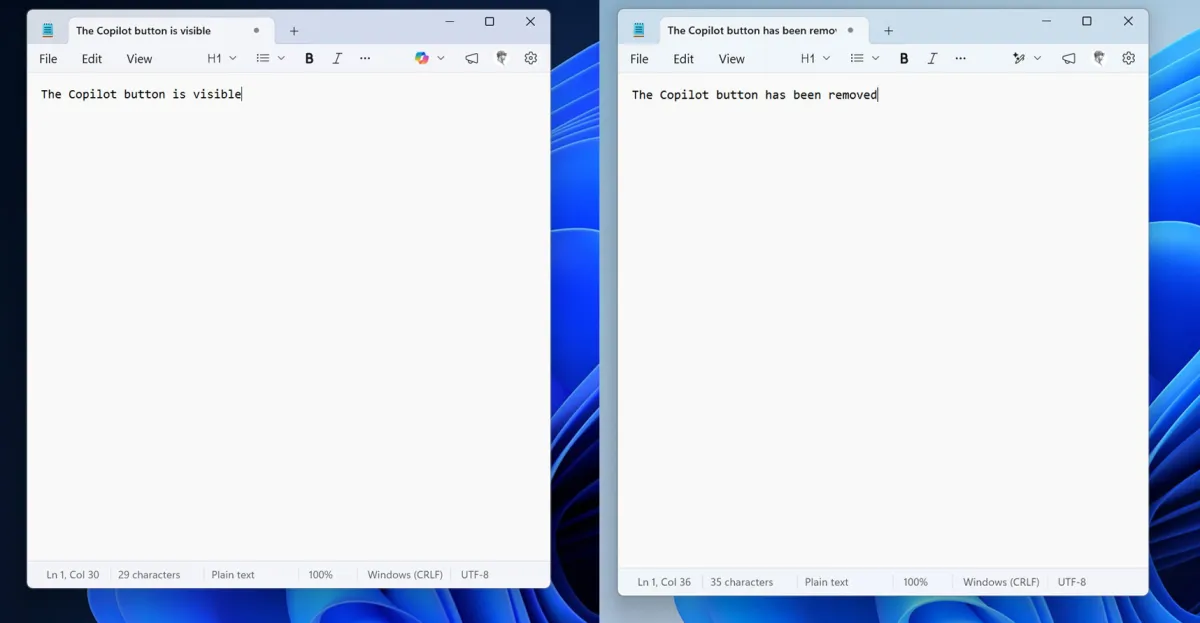
In a bid to refine the user experience of Windows 11, Microsoft has begun stripping away what it deems “unnecessary” Copilot buttons from its suite of applications. The tech giant, which has been under increasing scrutiny for its Windows 11 performance, is making strategic changes to reduce clutter and improve functionality. The latest update, rolled out to Windows Insiders, sees the removal of Copilot buttons in apps like Notepad and the Snipping Tool, replaced with more streamlined and contextually appropriate features. While the move aims to declutter the interface, Microsoft assures users that the underlying artificial intelligence (AI) capabilities will remain intact, signaling a shift in how the company integrates its AI tools into everyday applications.
A Shift in Strategy: From Prominent AI Branding to Subtle Integration
Microsoft’s Copilot, an AI-driven assistant embedded across its ecosystem, was introduced as a flagship feature to enhance productivity and creativity. However, its omnipresence in Windows 11 apps has drawn mixed reactions from users. While some lauded its capabilities, others criticized the intrusive placement of Copilot buttons in applications where they seemed redundant—particularly in lightweight tools like Notepad. The latest changes reflect Microsoft’s responsiveness to user feedback and its commitment to delivering a more intuitive and efficient operating system.
In the updated Notepad app, the Copilot button has been replaced with a “writing tools” menu. This new menu retains the AI-powered features but presents them in a less obtrusive manner. Similarly, the Snipping Tool, a handy utility for capturing screenshots, no longer displays the Copilot button when users select an area to capture. These adjustments are part of Microsoft’s broader initiative to reduce “unnecessary Copilot entry points” across its suite of apps, including Photos and Widgets.
Context: Microsoft’s Broader Effort to Enhance Windows 11
The removal of Copilot buttons is not an isolated move but part of Microsoft’s larger strategy to address performance issues and improve the overall user experience of Windows 11. Launched in October 2021, Windows 11 was marketed as a significant upgrade over its predecessor, with a sleek design, enhanced multitasking features, and deep integration of AI technologies. However, the operating system has faced criticism for inconsistent performance, bugs, and feature bloat.
Earlier this year, Microsoft pledged to prioritize quality and performance improvements, committing to a series of updates aimed at streamlining the OS. The removal of excessive Copilot branding aligns with this vision, offering users a cleaner interface while retaining the functionality they rely on. By focusing on reducing unnecessary elements, Microsoft is taking a more measured approach to integrating AI, ensuring that it enhances rather than disrupts the user experience.
User Reactions: Mixed Feedback on AI Integration
The introduction of Copilot buttons across Windows 11 apps initially sparked a debate among users and tech enthusiasts. While some appreciated the convenience of having AI-powered tools readily accessible, others found the buttons intrusive and out of place in applications designed for simplicity. Notepad, for instance, has long been valued for its lightweight and straightforward nature, making the addition of AI features seem superfluous to many.
The recent changes have been met with cautious optimism. By replacing the Copilot button with a “writing tools” menu in Notepad, Microsoft has subtly acknowledged user feedback without entirely removing AI functionality. This approach strikes a balance, allowing users to access advanced features when needed while maintaining the app’s minimalist ethos.
What Does This Mean for the Future of Copilot?
The removal of Copilot buttons does not signify a retreat from AI integration but rather a refinement of its implementation. Microsoft has made it clear that Copilot remains a cornerstone of its strategy, with AI features continuing to play a pivotal role across its ecosystem. The changes suggest a shift from overt branding to seamless integration, where AI tools are embedded in ways that feel natural and contextually relevant.
This evolution mirrors broader trends in the tech industry, as companies increasingly focus on making AI tools accessible without overwhelming users. By adopting a more thoughtful approach to AI integration, Microsoft aims to enhance the utility of its applications while preserving their core functionalities.
Implications for Developers and Third-Party Apps
Microsoft’s decision to streamline Copilot buttons could also influence how third-party developers design their applications for Windows 11. As the operating system evolves, developers may need to reconsider how they integrate AI features, ensuring they align with Microsoft’s emphasis on simplicity and utility. This shift could lead to more cohesive and user-friendly apps across the Windows ecosystem.
Looking Ahead: A Focus on Quality and User-Centric Design
The removal of unnecessary Copilot buttons underscores Microsoft’s renewed focus on quality and user-centric design. As the company continues to refine Windows 11, users can expect further updates aimed at improving performance, reducing clutter, and enhancing functionality. These efforts reflect Microsoft’s commitment to listening to its user base and adapting its strategy to meet their needs.
While the changes may seem minor, they represent an important step in Microsoft’s journey to elevate the Windows 11 experience. By prioritizing usability and efficiency, the tech giant is laying the groundwork for a more polished and intuitive operating system.
Conclusion: A Balanced Approach to AI Integration
Microsoft’s decision to remove superfluous Copilot buttons from Windows 11 apps marks a thoughtful pivot in its approach to AI integration. By addressing user feedback and focusing on simplicity, the company is striking a balance between innovation and usability. While Copilot’s AI capabilities remain central to Microsoft’s vision, their more discreet implementation signals a maturing strategy—one that respects the user experience while harnessing the power of artificial intelligence. As Windows 11 continues to evolve, these changes remind us that technology’s greatest potential lies not in its complexity, but in its ability to seamlessly enhance our daily lives.
