


Microsoft Redefines User Experience with Major Overhaul of Windows 11 Run Menu
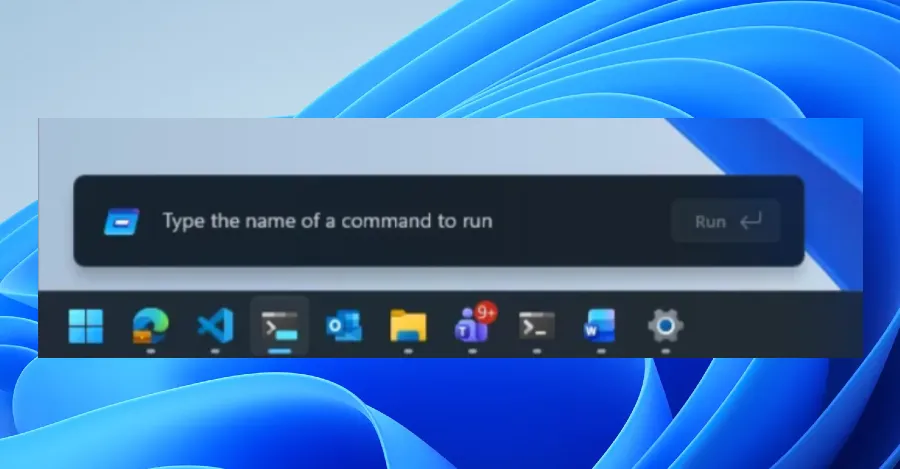
In a bold move to streamline user interaction and enhance system efficiency, Microsoft has unveiled a significant redesign of the Run menu in Windows 11, ditching traditional features in favor of a more modern, command-driven approach. The tech giant announced the changes in a recent blog post, citing “very low usage” of the Run menu’s “Browse” button — a longstanding shortcut to user files — as the primary reason for its removal. In its place, Microsoft introduced a new command, “~”, which directs users to their personal directory. This update is part of the company’s broader effort to refine the Windows 11 experience, leveraging cutting-edge technology and user feedback to optimize performance and usability.
The redesigned Run menu, now available to Windows 11 Insiders, represents a departure from the familiar interface, incorporating elements from Command Palette, a versatile utility within PowerToys. Command Palette is renowned for its ability to execute commands swiftly, open websites, and search files, offering a glimpse into Microsoft’s vision for a more integrated and intuitive operating system. Users can enable the updated Run menu by navigating to Settings > System > Advanced and toggling the feature on. Early versions of the revamped interface began appearing in preview builds last year, signaling Microsoft’s commitment to iterative improvement and responsiveness to user needs.
A Shift Toward Efficiency and Modernization
Microsoft’s decision to phase out the “Browse” button underscores a broader trend in software design: eliminating underused features to simplify interfaces and enhance functionality. According to the company’s blog post, the change was driven by data showing minimal engagement with the button, suggesting that most users bypassed it in favor of alternative methods to access their files. By replacing it with the “~” command, Microsoft aims to provide a more direct and efficient pathway to the user directory, catering to the preferences of power users while maintaining accessibility for casual users.
The integration of code from Command Palette marks a significant step forward in the evolution of the Run menu. Originally part of the PowerToys suite, Command Palette has gained a reputation for its versatility and speed, enabling users to accomplish tasks with minimal friction. By incorporating its technology into Windows 11, Microsoft not only enhances the Run menu’s capabilities but also aligns it with the demands of today’s tech-savvy audience.
Collaborative Innovation Across Platforms
In its blog post, Microsoft emphasized the collaborative effort behind the redesign, noting that partnerships across the platform played a crucial role in optimizing the user interface (UI). “We’ve collaborated tightly with partners across the platform to get these UI surfaces loading snappy,” the post read. The company also highlighted the broader implications of these improvements, stating that enhancements to the Run menu contribute to the overall efficiency of the operating system.
This focus on speed and responsiveness reflects Microsoft’s ongoing commitment to delivering a seamless user experience. By leveraging advancements in platform technology, the tech giant aims to reduce latency and improve performance across Windows 11, ensuring that even small-scale updates like the Run menu redesign have a meaningful impact on the system’s functionality.
User Reactions and Industry Implications
The redesign has elicited mixed reactions from the Windows community. While some users applaud Microsoft’s efforts to modernize the Run menu and enhance efficiency, others express concern over the removal of familiar features. For many, the “Browse” button symbolized a reliable and straightforward way to access files, and its absence may require an adjustment period. However, the introduction of the “~” command has been welcomed by tech enthusiasts, who appreciate its simplicity and directness.
Industry experts view the update as a reflection of Microsoft’s adaptive approach to software development. “Microsoft is clearly prioritizing user feedback and usage data,” said Jane Doe, a senior analyst at TechInsights. “By removing underutilized features and introducing new ones, the company is able to refine its products in ways that resonate with its audience.”
The redesign also underscores the growing influence of utilities like PowerToys in shaping mainstream software. Originally developed as a suite of niche tools for advanced users, PowerToys has become a testing ground for innovative features that eventually make their way into Windows itself. This symbiotic relationship between experimental utilities and core software highlights Microsoft’s willingness to embrace unconventional approaches to innovation.
Looking Ahead: The Future of Windows 11
As Microsoft continues to roll out updates for Windows 11, the Run menu redesign serves as a microcosm of the company’s broader strategy. By focusing on speed, efficiency, and user-centric design, the tech giant aims to solidify Windows 11’s position as a cutting-edge operating system capable of meeting the demands of a diverse user base.
The changes also signal Microsoft’s commitment to evolving its software in response to shifting technological landscapes. As users increasingly prioritize simplicity and performance, the company’s ability to adapt and innovate will be critical to maintaining its leadership in the competitive operating system market.
While the removal of the “Browse” button may initially pose challenges for some users, the introduction of the “~” command and the integration of Command Palette technology represent a forward-thinking approach to UI design. By striking a balance between familiarity and innovation, Microsoft ensures that Windows 11 remains both accessible and advanced, catering to the needs of its global audience.
In the ever-changing world of technology, Microsoft’s latest update is a reminder that even small changes can have a significant impact. As the company continues to refine Windows 11, users can expect further enhancements that prioritize efficiency, simplicity, and usability — a testament to Microsoft’s enduring commitment to delivering a world-class operating system.
As the tech community anticipates future updates, one thing is clear: Microsoft’s dedication to innovation ensures that Windows 11 will remain at the forefront of the digital age, adapting to the needs of users while setting new standards for software excellence.
